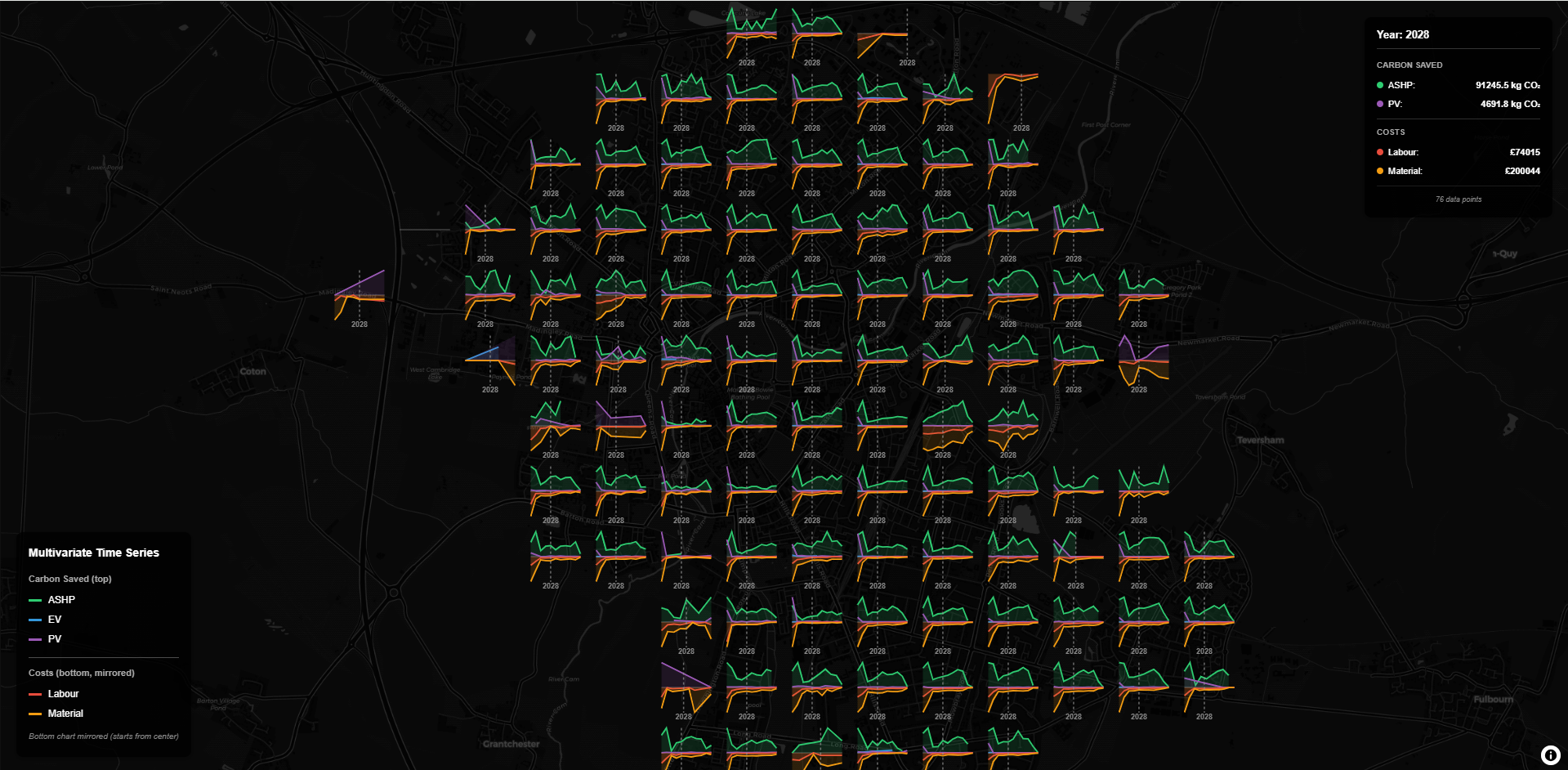
A GPU/Canvas hybrid Screen-Space Grid Aggregation library for MapLibre GL JS. This library provides efficient real-time aggregation of point data into screen-space grids with customizable styling, interactive features, and advanced glyph drawing capabilities. It now also supports non-point geometries via a geometry placement preprocessor and a per-feature glyph rendering mode.
This library is inspired by Aidan Slingsbyβs Gridded Glyphmaps and borrows some basic concepts from deck.glβs ScreenGridLayer, but is built from the ground up with a modular architecture, focusing on performance, flexibility, and ease of use, particularly for MaplibreGL ecosystem.

screen-grid) and hexagonal tessellation (screen-hex)circle, bar, pie, heatmap) plus utilities for custom pluginssource with placement strategies for Polygon/Line inputsrenderMode: 'feature-anchors'screengrid/
βββ src/
β βββ index.js # Main entry point
β βββ ScreenGridLayerGL.js # Main orchestrator class
β βββ config/ConfigManager.js # Configuration management
β βββ core/ # Core business logic (pure)
β β βββ Aggregator.js
β β βββ Projector.js
β β βββ CellQueryEngine.js
β βββ canvas/ # Canvas rendering
β β βββ CanvasManager.js
β β βββ Renderer.js
β βββ events/ # Event system
β β βββ EventBinder.js
β β βββ EventHandlers.js
β βββ glyphs/GlyphUtilities.js # Glyph drawing utilities
β βββ legend/ # Legend system
β βββ Legend.js
β βββ LegendDataExtractor.js
β βββ LegendRenderers.js
βββ dist/ # Built distribution files
βββ docs/
β βββ ARCHITECTURE.md # Detailed architecture guide
β βββ USAGE.md # Detailed usage guide
β βββ README.md
βββ examples/
β βββ index.html
β βββ simple-test.html
β βββ test.html
β βββ legend-example.html
β βββ timeseries.html
β βββ multivariate-timeseries.html
βββ package.json
βββ rollup.config.mjs
# From npm
npm install screengrid
# Peer dependency (you manage this in your app)
npm install maplibre-gl
# Or clone the repository for development
git clone https://github.com/danylaksono/screengrid.git
cd screengrid
npm install
npm run build
# To run examples locally, use a simple HTTP server:
npx http-server -p 8000
# Then open http://localhost:8000/examples/ in your browser
// ESM (bundlers / modern Node)
import { ScreenGridLayerGL } from 'screengrid';
import maplibregl from 'maplibre-gl';
// Initialize MapLibre map
const map = new maplibregl.Map({
container: 'map',
style: 'https://demotiles.maplibre.org/style.json',
center: [-122.4, 37.74],
zoom: 11
});
map.on('load', async () => {
// Load your data
const data = await fetch('your-data.json').then(r => r.json());
// Create grid layer
const gridLayer = new ScreenGridLayerGL({
data: data,
getPosition: (d) => d.coordinates,
getWeight: (d) => d.weight,
cellSizePixels: 60,
colorScale: (v) => [255 * v, 200 * (1 - v), 50, 220]
});
// Add to map
map.addLayer(gridLayer);
});
// CJS require
const { ScreenGridLayerGL } = require('screengrid');
const maplibregl = require('maplibre-gl');
<!-- UMD build exposes global `ScreenGrid` -->
<script src="https://unpkg.com/screengrid/dist/screengrid.umd.min.js"></script>
<!-- MapLibre (peer) must also be included on the page -->
<link href="https://unpkg.com/maplibre-gl@^4/dist/maplibre-gl.css" rel="stylesheet" />
<script src="https://unpkg.com/maplibre-gl@^4/dist/maplibre-gl.js"></script>
<script>
const { ScreenGridLayerGL } = ScreenGrid;
// use ScreenGridLayerGL here
// ...
// map.addLayer(new ScreenGridLayerGL({...}))
</script>
<div id="map" style="position:absolute;top:0;bottom:0;width:100%"></div>
<link href="https://unpkg.com/maplibre-gl@^4/dist/maplibre-gl.css" rel="stylesheet" />
<script src="https://unpkg.com/maplibre-gl@^4/dist/maplibre-gl.js"></script>
<script src="https://unpkg.com/screengrid/dist/screengrid.umd.min.js"></script>
<script>
const map = new maplibregl.Map({
container: 'map',
style: 'https://demotiles.maplibre.org/style.json',
center: [-122.4, 37.74],
zoom: 11
});
map.on('load', async () => {
const data = await fetch('your-data.json').then(r => r.json());
const layer = new ScreenGrid.ScreenGridLayerGL({
data,
getPosition: d => d.coordinates,
getWeight: d => d.weight,
cellSizePixels: 60,
colorScale: v => [255 * v, 200 * (1 - v), 50, 220]
});
map.addLayer(layer);
});
// Optional: hover/click handlers
// layer.setConfig({ onHover: ({cell}) => console.log(cell) });
</script>
dist/screengrid.mjsdist/screengrid.cjsdist/screengrid.umd.jsdist/screengrid.umd.min.jsmaplibre-gl is a peer dependency and is not bundled. In UMD builds, it is expected as a global maplibregl.
The library supports custom glyph drawing through the onDrawCell callback and a powerful Plugin Ecosystem for reusable glyph visualizations. This enables rich multivariate visualizations including time series, categorical breakdowns, and complex relationships.
π π Comprehensive Guide: See docs/GLYPH_DRAWING_GUIDE.md for detailed documentation on:
π π Data Utilities: See docs/DATA_UTILITIES.md for utility functions that simplify common data processing patterns:
groupBy - Group data by categoriesextractAttributes - Extract multiple attributes from cellDatacomputeStats - Compute statistics for uncertainty encodinggroupByTime - Group data by time periods for temporal visualizationsconst gridLayer = new ScreenGridLayerGL({
data: bikeData,
getPosition: (d) => d.COORDINATES,
getWeight: (d) => d.SPACES,
enableGlyphs: true,
onDrawCell: (ctx, x, y, normVal, cellInfo) => {
const { cellData, glyphRadius } = cellInfo;
// Calculate aggregated values
const totalRacks = cellData.reduce((sum, item) => sum + item.data.RACKS, 0);
const totalSpaces = cellData.reduce((sum, item) => sum + item.data.SPACES, 0);
// Draw custom glyph
ctx.fillStyle = `hsl(${200 + normVal * 60}, 70%, 50%)`;
ctx.beginPath();
ctx.arc(x, y, glyphRadius, 0, 2 * Math.PI);
ctx.fill();
// Add text
ctx.fillStyle = '#ffffff';
ctx.font = 'bold 12px Arial';
ctx.textAlign = 'center';
ctx.fillText(totalSpaces.toString(), x, y);
}
});
ScreenGrid includes a Plugin Ecosystem that allows you to create reusable, named glyph visualizations. This system provides:
circle, bar, pie, heatmap)onDrawCell callbacks work with highest precedenceπ π Full Documentation: See docs/PLUGIN_GLYPH_ECOSYSTEM.md for comprehensive plugin documentation, API reference, and usage patterns.
import { ScreenGridLayerGL } from 'screengrid';
// Use a built-in plugin
const layer = new ScreenGridLayerGL({
data,
getPosition: (d) => d.coordinates,
glyph: 'circle', // Built-in plugin name
glyphConfig: {
radius: 15,
color: '#3498db',
alpha: 0.9
},
enableGlyphs: true
});
circle - Simple filled circle with customizable size, color, and opacitybar - Horizontal bar chart showing multiple values side-by-sidepie - Pie chart showing proportional distribution of valuesheatmap - Circle with color intensity representing normalized valuesimport { ScreenGridLayerGL, GlyphRegistry } from 'screengrid';
// Define a custom plugin
const MyCustomGlyph = {
draw(ctx, x, y, normalizedValue, cellInfo, config) {
const radius = config.radius || cellInfo.glyphRadius;
ctx.fillStyle = config.color || '#3498db';
ctx.beginPath();
ctx.arc(x, y, radius, 0, 2 * Math.PI);
ctx.fill();
},
// Optional: initialization hook
init({ layer, config }) {
console.log(`Initializing plugin for layer ${layer.id}`);
return {
destroy() {
console.log('Cleaning up plugin');
}
};
},
// Optional: legend support
getLegend(gridData, config) {
return {
type: 'custom',
title: 'My Visualization',
items: [
{ label: 'Category A', color: '#ff0000' },
{ label: 'Category B', color: '#00ff00' }
]
};
}
};
// Register the plugin
GlyphRegistry.register('myGlyph', MyCustomGlyph);
// Use the registered plugin
const layer = new ScreenGridLayerGL({
data,
glyph: 'myGlyph', // Use by name
glyphConfig: { radius: 15, color: '#ff6600' },
enableGlyphs: true
});
When rendering glyphs, the system uses the following precedence order (highest to lowest):
onDrawCell callback (full backward compatibility)glyph nameThis ensures backward compatibility while allowing gradual migration to the plugin system.
See examples/plugin-glyph.html for a complete example demonstrating:
grouped-bar plugin)init and destroy)π For detailed plugin API documentation: See docs/PLUGIN_GLYPH_ECOSYSTEM.md
To run the examples locally:
npx http-server -p 8000
# Then open http://localhost:8000/examples/ in your browser
examples/index.html) - Complete interactive demo with all featuresexamples/simple-test.html) - Basic functionality verificationexamples/test.html) - Original test implementationexamples/legend-example.html) - Demonstrates legend functionalityexamples/timeseries.html) - Temporal data visualizationexamples/multivariate-timeseries.html) - Advanced multi-attribute temporal visualizationexamples/plugin-glyph.html) - Complete plugin ecosystem example with custom grouped-bar plugin, lifecycle hooks, and legend integrationexamples/data-utilities.html) - Demonstrates data utility functions (groupBy, extractAttributes, computeStats, groupByTime)examples/hex-mode.html) - Hexagonal aggregation mode with interactive controlsexamples/hex-mode-simple.html) - Simple hexagonal aggregation exampleexamples/us-states.html) - Geometry input example with polygon featuresexamples/creative-coding.html) - Artistic visualizations: mosaic tiles, tessellations, particles, and abstract patterns demonstrating the libraryβs creative coding capabilities| Option | Type | Default | Description |
|---|---|---|---|
id |
string | "screen-grid-layer" |
Unique identifier for the layer |
data |
Array | [] |
Array of data points to aggregate (legacy point input) |
getPosition |
Function | (d) => d.coordinates |
Function to extract coordinates from data |
getWeight |
Function | () => 1 |
Function to extract weight from data |
cellSizePixels |
number | 50 |
Size of each grid cell in pixels |
colorScale |
Function | (v) => [255 * v, 100, 200, 200] |
Color scale function |
onAggregate |
Function | null |
Callback when grid is aggregated |
onHover |
Function | null |
Callback when hovering over cells |
onClick |
Function | null |
Callback when clicking cells |
onDrawCell |
Function | null |
Callback for custom glyph drawing (highest precedence) |
enableGlyphs |
boolean | false |
Enable glyph-based rendering (when true and a glyph is active, cell backgrounds are off by default unless aggregationModeConfig.showBackground === true) |
glyph |
string | null |
Registered plugin name to use (e.g., 'circle', 'bar', 'pie', 'heatmap') |
glyphConfig |
object | {} |
Configuration object passed to pluginβs draw() method |
glyphSize |
number | 0.8 |
Size of glyphs relative to cell size |
aggregationFunction |
Function|string | 'sum' |
Aggregation function or name (see Aggregation Functions) |
normalizationFunction |
Function|string | 'max-local' |
Normalization function or name (see Normalization Functions) |
normalizationContext |
object | {} |
Additional context for normalization (e.g., {globalMax: 1000}) |
aggregationMode |
string | 'screen-grid' |
Aggregation mode: 'screen-grid' (rectangular) or 'screen-hex' (hexagonal) |
aggregationModeConfig |
object | {} |
Mode-specific configuration (e.g., {hexSize: 50, showBackground: true} for hex mode) |
adaptiveCellSize |
boolean | false |
Enable adaptive cell sizing |
minCellSize |
number | 20 |
Minimum cell size in pixels |
maxCellSize |
number | 100 |
Maximum cell size in pixels |
zoomBasedSize |
boolean | false |
Adjust cell size based on zoom level |
enabled |
boolean | true |
Whether the layer is enabled |
debugLogs |
boolean | false |
Enable verbose debug logging (useful for troubleshooting) |
source |
GeoJSON | null |
GeoJSON Feature/FeatureCollection or array of Features (mutually exclusive with data) |
placement |
object | null |
Placement config to derive anchors from geometries (see docs) |
renderMode |
'screen-grid'|'feature-anchors' |
'screen-grid' |
Rendering path (aggregate vs draw directly) |
anchorSizePixels |
number | auto |
Glyph size in pixels for feature-anchors mode |
See docs/GEOMETRY_INPUT_AND_PLACEMENT.md and docs/PLACEMENT_CONFIG.md for geometry input, placement strategies, and validation rules.
ScreenGrid supports multiple aggregation modes for different visualization needs. The default mode is screen-grid (rectangular cells), but you can also use screen-hex for hexagonal tessellation.
screen-grid (Default)Rectangular grid cells aligned to screen pixels. This is the classic ScreenGrid behavior.
const layer = new ScreenGridLayerGL({
data: myData,
aggregationMode: 'screen-grid', // Default, can be omitted
cellSizePixels: 50
});
screen-hexHexagonal tessellation in screen space. Provides a more organic, visually appealing grid pattern.
const layer = new ScreenGridLayerGL({
data: myData,
aggregationMode: 'screen-hex',
aggregationModeConfig: {
hexSize: 50, // Size of hexagons (similar to cellSizePixels)
showBackground: true // Show colored hexagon backgrounds
}
});
Each mode can have mode-specific configuration via aggregationModeConfig:
For screen-hex:
hexSize (number): Size of hexagons in pixels (defaults to cellSizePixels if not provided)showBackground (boolean): Whether to show colored hexagon backgrounds (default: false when glyphs are enabled)For screen-grid:
showBackground (boolean): Whether to show colored cell backgrounds (default: false when glyphs are enabled)You can register custom aggregation modes using the AggregationModeRegistry:
import { AggregationModeRegistry } from 'screengrid';
const MyCustomMode = {
name: 'my-custom-mode',
type: 'screen-space', // or 'geographic'
aggregate(data, getPosition, getWeight, map, config) {
// Custom aggregation logic
return aggregationResult;
},
render(aggregationResult, ctx, config, map) {
// Custom rendering logic
},
getCellAt(point, aggregationResult, map) {
// Custom cell query logic
return cellInfo;
},
getStats(aggregationResult) {
// Optional: custom statistics
return stats;
},
needsUpdateOnZoom() { return true; },
needsUpdateOnMove() { return true; }
};
AggregationModeRegistry.register('my-custom-mode', MyCustomMode);
// Use it
const layer = new ScreenGridLayerGL({
data: myData,
aggregationMode: 'my-custom-mode'
});
See examples/hex-mode.html and examples/hex-mode-simple.html for complete examples of hexagonal aggregation.
ScreenGrid supports flexible aggregation functions that determine how multiple data points within a cell are combined. You can use built-in functions or provide custom functions.
import { AggregationFunctions } from 'screengrid';
// Sum (default) - sums all weights in a cell
aggregationFunction: AggregationFunctions.sum
// or
aggregationFunction: 'sum'
// Mean - average of all weights
aggregationFunction: AggregationFunctions.mean
// or
aggregationFunction: 'mean'
// Count - number of points in a cell
aggregationFunction: AggregationFunctions.count
// or
aggregationFunction: 'count'
// Max - maximum weight value
aggregationFunction: AggregationFunctions.max
// or
aggregationFunction: 'max'
// Min - minimum weight value
aggregationFunction: AggregationFunctions.min
// or
aggregationFunction: 'min'
You can provide your own aggregation function to support multi-attribute aggregation or custom calculations:
// Single-value custom aggregation
aggregationFunction: (cellData) => {
// cellData is array of {data, weight, projectedX, projectedY}
return cellData.reduce((sum, item) => sum + item.weight * 2, 0);
}
// Multi-attribute aggregation (returns object)
aggregationFunction: (cellData) => {
return {
total: cellData.reduce((sum, item) => sum + item.weight, 0),
count: cellData.length,
avg: cellData.reduce((sum, item) => sum + item.weight, 0) / cellData.length,
max: Math.max(...cellData.map(item => item.weight)),
// Access original data attributes
categories: cellData.map(item => item.data.category)
};
}
import { AggregationFunctionRegistry } from 'screengrid';
// Register a custom function
AggregationFunctionRegistry.register('custom-sum', (cellData) => {
return cellData.reduce((sum, item) => sum + item.weight, 0);
});
// Use it by name
aggregationFunction: 'custom-sum'
Note: When using multi-attribute aggregation (returning objects), normalization is skipped automatically. Youβll need to handle normalization in your glyph drawing function (onDrawCell) or custom glyph plugin.
Normalization functions convert raw aggregated cell values to a normalized range (0-1) for consistent rendering. You can use built-in strategies or provide custom functions.
import { NormalizationFunctions } from 'screengrid';
// Max-local (default) - normalizes relative to max value in current grid
normalizationFunction: NormalizationFunctions.maxLocal
// or
normalizationFunction: 'max-local'
// Max-global - normalizes relative to a global maximum
normalizationFunction: NormalizationFunctions.maxGlobal
// Requires normalizationContext: {globalMax: 1000}
normalizationContext: { globalMax: 1000 }
// Z-score - normalizes using z-score transformation
normalizationFunction: NormalizationFunctions.zScore
// or
normalizationFunction: 'z-score'
// Percentile - normalizes based on percentile rank
normalizationFunction: NormalizationFunctions.percentile
// or
normalizationFunction: 'percentile'
// Custom normalization function
normalizationFunction: (grid, cellValue, cellIndex, context) => {
// grid: array of all cell values
// cellValue: value of current cell
// cellIndex: index of current cell
// context: {max, min, mean, std, totalValue, cellsWithData, ...custom}
// Example: logarithmic normalization
if (cellValue === 0 || context.max === 0) return 0;
return Math.log(cellValue + 1) / Math.log(context.max + 1);
}
import { NormalizationFunctionRegistry } from 'screengrid';
// Register a custom function
NormalizationFunctionRegistry.register('log-normal', (grid, cellValue, cellIndex, context) => {
if (cellValue === 0 || context.max === 0) return 0;
return Math.log(cellValue + 1) / Math.log(context.max + 1);
});
// Use it by name
normalizationFunction: 'log-normal'
import { ScreenGridLayerGL, AggregationFunctions, NormalizationFunctions } from 'screengrid';
const layer = new ScreenGridLayerGL({
data: myData,
getPosition: d => d.coordinates,
getWeight: d => d.value,
// Use mean aggregation instead of sum
aggregationFunction: AggregationFunctions.mean,
// Use z-score normalization
normalizationFunction: NormalizationFunctions.zScore,
// Or use global normalization with context
normalizationFunction: NormalizationFunctions.maxGlobal,
normalizationContext: { globalMax: 10000 },
colorScale: (v) => [255 * v, 200 * (1 - v), 50, 220]
});
// Circle glyph
ScreenGridLayerGL.drawCircleGlyph(ctx, x, y, radius, color, alpha);
// Bar chart glyph
ScreenGridLayerGL.drawBarGlyph(ctx, x, y, values, maxValue, cellSize, colors);
// Pie chart glyph
ScreenGridLayerGL.drawPieGlyph(ctx, x, y, values, radius, colors);
// Scatter plot glyph
ScreenGridLayerGL.drawScatterGlyph(ctx, x, y, points, cellSize, color);
// Donut chart glyph (v2.0.0+)
ScreenGridLayerGL.drawDonutGlyph(ctx, x, y, values, outerRadius, innerRadius, colors);
// Heatmap intensity glyph (v2.0.0+)
ScreenGridLayerGL.drawHeatmapGlyph(ctx, x, y, radius, normalizedValue, colorScale);
// Radial bar chart glyph (v2.0.0+)
ScreenGridLayerGL.drawRadialBarGlyph(ctx, x, y, values, maxValue, maxRadius, color);
The GlyphRegistry manages the plugin ecosystem and provides methods for registering and managing glyph plugins:
import { GlyphRegistry } from 'screengrid';
// Register a plugin
GlyphRegistry.register(name, plugin, { overwrite = false })
// Retrieve a plugin
GlyphRegistry.get(name)
// Check if plugin exists
GlyphRegistry.has(name)
// List all registered plugins
GlyphRegistry.list()
// Unregister a plugin
GlyphRegistry.unregister(name)
// Clear all plugins (use with caution)
GlyphRegistry.clear()
See Plugin Ecosystem section above for detailed usage examples.
The AggregationModeRegistry manages aggregation mode plugins:
import { AggregationModeRegistry } from 'screengrid';
// Register a custom mode
AggregationModeRegistry.register(name, modePlugin, { overwrite = false })
// Retrieve a mode
AggregationModeRegistry.get(name)
// Check if mode exists
AggregationModeRegistry.has(name)
// List all registered modes
AggregationModeRegistry.list()
// Unregister a mode
AggregationModeRegistry.unregister(name)
The Logger utility provides controlled debug logging:
import { Logger, setDebug } from 'screengrid';
// Enable/disable debug logging globally
setDebug(true);
// Use logger (logs only when debug is enabled)
Logger.log('Debug message');
Logger.warn('Warning message');
Logger.error('Error message'); // Always shown, even when debug is disabled
Note: Debug logging can also be controlled via the debugLogs configuration option.
The library exports various modules and utilities that you can use independently:
ScreenGridLayerGL - Main layer classAggregator - Pure aggregation logicProjector - Coordinate projection utilitiesCellQueryEngine - Spatial query engineAggregationModeRegistry - Registry for aggregation modesScreenGridMode - Rectangular grid modeScreenHexMode - Hexagonal grid modeAggregationFunctionRegistry - Registry for aggregation functionsAggregationFunctions - Built-in aggregation functions (sum, mean, count, max, min)NormalizationFunctionRegistry - Registry for normalization functionsNormalizationFunctions - Built-in normalization functions (max-local, max-global, z-score, percentile)GlyphUtilities - Low-level glyph drawing utilitiesGlyphRegistry - Registry for glyph pluginsPlacementEngine - Geometry placement enginePlacementValidator - Placement configuration validatorPlacementStrategyRegistry - Registry for placement strategiesGeometryUtils - Geometry utility functionsCanvasManager - Canvas lifecycle managementRenderer - Rendering logicEventBinder - Event binding managementEventHandlers - Event handler implementationsConfigManager - Configuration managementLogger - Debug logging utilitysetDebug - Enable/disable debug logginggroupBy - Group data by categoriesextractAttributes - Extract multiple attributescomputeStats - Compute statisticsgroupByTime - Group data by time periodsLegend - Legend classLegendDataExtractor - Legend data extractionLegendRenderers - Legend rendering utilitiesExample:
import {
ScreenGridLayerGL,
AggregationModeRegistry,
GlyphRegistry,
Logger,
setDebug
} from 'screengrid';
The library includes a powerful Legend module for automatically generating data-driven legends:
import { Legend } from 'screengrid';
// Create a legend connected to your grid layer
const legend = new Legend({
layer: gridLayer,
type: 'auto', // 'color-scale', 'categorical', 'temporal', 'size-scale', 'auto', 'multi'
position: 'bottom-right', // 'top-left', 'top-right', 'bottom-left', 'bottom-right'
title: 'Data Legend'
});
// The legend automatically updates when the grid is aggregated
color-scale: Continuous color scale legendcategorical: Categorical/discrete values legendtemporal: Time-based legend for temporal datasize-scale: Size-based legendauto: Automatically detects the best legend typemulti: Multi-attribute legend for complex visualizationsSee examples/legend-example.html for detailed usage examples.
enableGlyphs: true and onDrawCell callback is providedEnable debug logging via the debugLogs configuration option:
const layer = new ScreenGridLayerGL({
data: myData,
debugLogs: true // Enable verbose debug logging
});
Or programmatically:
import { setDebug } from 'screengrid';
setDebug(true); // Enable debug logging globally
The library provides detailed logging for:
Note: Debug logs are disabled by default for performance. Enable only when troubleshooting.
dany laksono
MIT License - see LICENSE file for details.
screen-hex) for organic, visually appealing grid patternsAggregationModeRegistry) for extensible aggregation strategiesaggregationModeConfig optionsource option and placement strategiesrenderMode: 'feature-anchors' for drawing glyphs directly at anchor positionsgroupBy, extractAttributes, computeStats, groupByTime) for data processingdebugLogs option)onDrawCell callbackgetStats())getCellsInBounds(), getCellsAboveThreshold())