gridmapper
GridMapper


A JavaScript library for allocating geographic points to a grid using Mixed Integer Programming (MIP). This library provides an optimized solution for spatial data visualization by mapping geographic coordinates to grid cells while preserving spatial relationships.
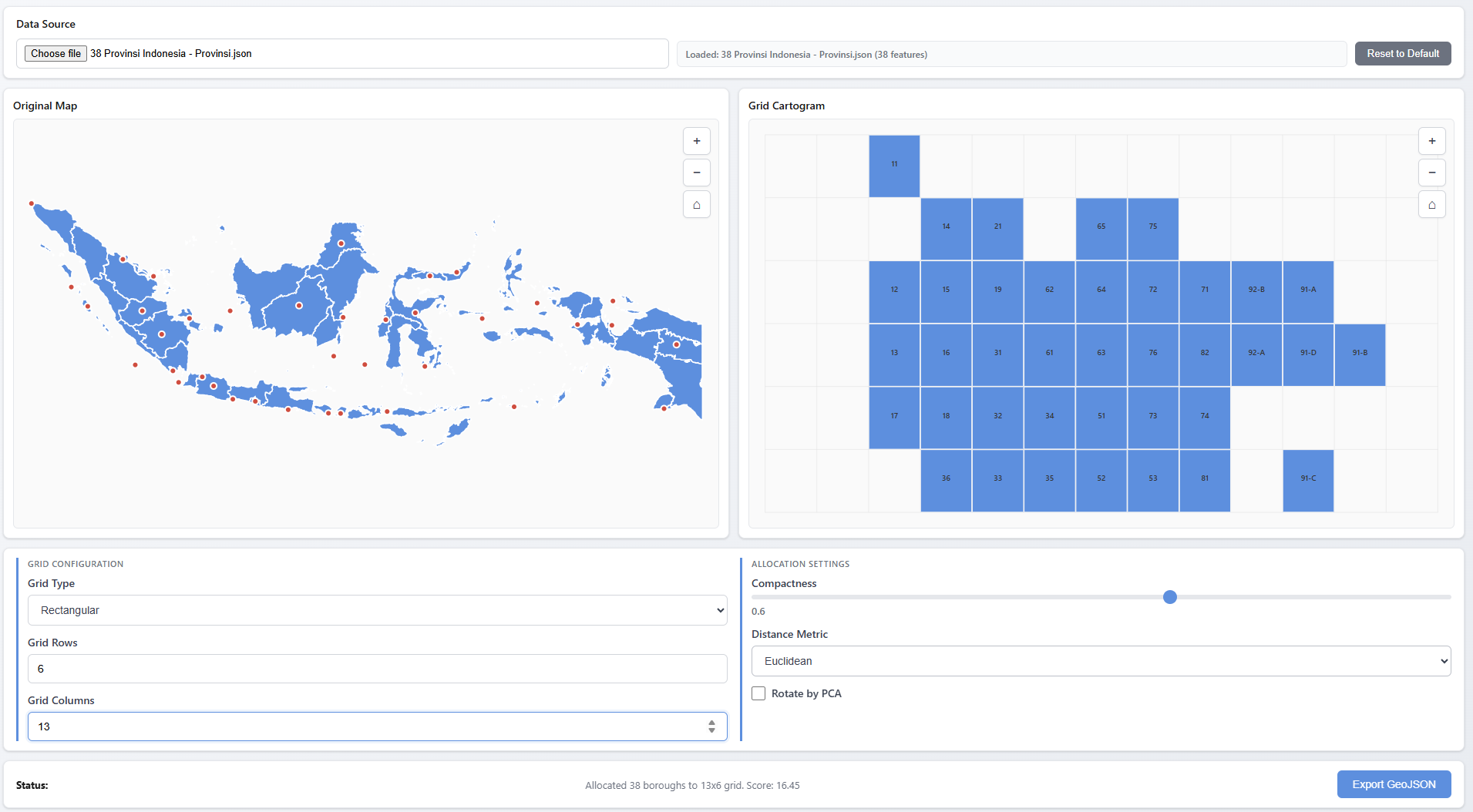
see the demo for the interactive demo and usage example.
Inspiration
This library is inspired by and builds upon the work of Jo Wood’s Grid Map Allocation library (@gridmap_allocation). The original implementation demonstrated the concept of using linear programming to allocate geographic points to grid cells. This library extends that work with small additional features and optimisations.
Features
- Simple API: Easy-to-use allocation method
- Advanced API: Extended features including:
- Auto-calculation of grid dimensions based on aspect ratio
- Principal Component Analysis (PCA) rotation for better alignment
- Support for hexagonal and rectangular grids
- Adjacency constraints for compact clustering
- Post-processing optimization with simulated annealing
- Flexible MIP Solver: Works with any MIP solver that implements the required interface (GLPK.js included)
Installation
npm install gridmapper
Quick Start
Simple API (matching original library)
import { GridMapper } from 'gridmapper';
import { GLPKSolver } from 'gridmapper/glpk-solver';
import glpk from 'glpk.js';

const glpkInstance = await glpk();
const mapper = new GridMapper();

const points = [
  [longitude1, latitude1],
  [longitude2, latitude2],
  // ... more points
];

const result = await mapper.allocateSimple(
  points,
  7,   // rows
  12,  // cols
  0.6, // compactness (0-1)
  [],  // spacers
  {
    mip: () => new GLPKSolver(glpkInstance)
  }
);

console.log(result.cells); // [[row, col], ...]
Advanced API
import { GridMapper } from 'gridmapper';
import { GLPKSolver } from 'gridmapper/glpk-solver';
import glpk from 'glpk.js';

const glpkInstance = await glpk();
const mapper = new GridMapper();

const data = [
  { name: 'Location A', lon: -74.0, lat: 40.7 },
  { name: 'Location B', lon: -73.9, lat: 40.8 },
  // ... more locations
];

const result = await mapper.allocate(data, {
  xAccessor: d => d.lon,
  yAccessor: d => d.lat,
  compactness: 0.6,
  rotateByPCA: true,  // Align grid to principal axis
  gridType: 'rect',    // or 'hex'
  mip: () => new GLPKSolver(glpkInstance)
  // rows and cols are auto-calculated if not provided
});

// Result includes gridX and gridY properties added to each data item
result.assignments.forEach(item => {
  console.log(`${item.name}: grid[${item.gridX}, ${item.gridY}]`);
});
API Reference
GridMapper
allocateSimple(points, nRows, nCols, compactness, spacers, options)
Simple allocation API matching the original Jo Wood library.
Parameters:
points(Array): Array of[x, y]coordinates or objects with x/y accessorsnRows(number): Number of grid rowsnCols(number): Number of grid columnscompactness(number): 0 to 1. 0.5 = relative geo position, 1 = center clusterspacers(Array): Optional array of[row, col]spacer positionsoptions(Object): Optional configurationxAccessor(Function): Accessor for x coordinateyAccessor(Function): Accessor for y coordinatemip(Function): Factory function returning MIP solver instance
Returns: Promise<Object> with { nRows, nCols, cells: [[row, col], ...] }
allocate(data, options)
Advanced allocation API with extended features.
Parameters:
data(Array): Array of data objectsoptions(Object): Configuration optionsxAccessor(Function): Accessor for longitude/X coordinateyAccessor(Function): Accessor for latitude/Y coordinaterows(number): Optional number of grid rows (auto-calculated if not provided)cols(number): Optional number of grid columns (auto-calculated if not provided)compactness(number): 0 to 1, default 0.5mip(Function): Factory function returning MIP solver instance (required)rotateByPCA(boolean): Align grid to principal axis-
gridType(string): ‘rect’‘hex’ ‘ragged’ -
distanceMetric(string): ‘euclidean’‘manhattan’ spacers(Array): Array of[row, col]spacer positionsmask(Object): GeoJSON polygon for auto-computing spacersadjacencyWeight(number): Weight for adjacency constraintsrunSA(boolean): Run simulated annealing post-processing- And more…
Returns: Promise<Object> with { assignments: [...], meta: {...} }
Utility Functions
GeoJSON Export
The library provides utilities to export grid cartograms as GeoJSON for use in mapping libraries or GIS tools:
import { createGridGeoJson, createPointsGeoJson } from 'gridmapper';

// After allocation
const result = await mapper.allocate(data, options);

// Create GeoJSON for grid polygons (supports both 'rect' and 'hex' grid types)
// You can pass gridType directly or pass result.meta for convenience
const gridGeoJson = createGridGeoJson(
  result.assignments,
  result.meta.bounds,
  result.meta  // Automatically uses gridType from meta
);
// Or specify explicitly:
// const gridGeoJson = createGridGeoJson(result.assignments, result.meta.bounds, 'hex');

// Create GeoJSON for input points
const pointsGeoJson = createPointsGeoJson(data);

// Export to file or use with mapping libraries
console.log(JSON.stringify(gridGeoJson, null, 2));
createGridGeoJson(assignments, bounds, gridType)
assignments: Array of assignment objects fromallocate()resultbounds: Bounds object fromresult.meta.boundsgridType:'rect'(default) or'hex'- determines polygon shape- Returns: GeoJSON FeatureCollection with grid polygons
createPointsGeoJson(data)
data: Array of data objects withlon,lat, andnameproperties- Returns: GeoJSON FeatureCollection with point features
Parameter Estimation
The library provides utilities to automatically estimate optimal parameters for grid allocation:
import { estimateParameters, estimateParametersFromData } from 'gridmapper';

// Estimate from GeoJSON data
const geojson = {
  type: 'FeatureCollection',
  features: [
    { type: 'Feature', geometry: { type: 'Point', coordinates: [-74.0, 40.7] } },
    // ... more features
  ]
};

const estimatedParams = estimateParameters(geojson, {
  xAccessor: d => d.lon,
  yAccessor: d => d.lat
});

// Use estimated parameters
const result = await mapper.allocate(data, {
  ...estimatedParams,
  mip: () => new GLPKSolver(glpkInstance)
});

// Or estimate from processed data points
const data = [
  { name: 'Location A', lon: -74.0, lat: 40.7 },
  // ... more locations
];

const params = estimateParametersFromData(data, {
  xAccessor: d => d.lon,
  yAccessor: d => d.lat
});
estimateParameters(geojson, options)
geojson: GeoJSON FeatureCollection with Point, Polygon, or MultiPolygon featuresoptions: Configuration objectxAccessor(Function): Accessor for longitude/x coordinate (default:d => d.lon)yAccessor(Function): Accessor for latitude/y coordinate (default:d => d.lat)
- Returns: Object with
{ rows, cols, compactness, rotateByPCA }
estimateParametersFromData(data, options)
data: Array of data objects with x/y coordinatesoptions: Configuration objectxAccessor(Function): Accessor for x coordinate (default:d => d.x)yAccessor(Function): Accessor for y coordinate (default:d => d.y)
- Returns: Object with
{ rows, cols, compactness, rotateByPCA }
Examples
See the examples/ directory for complete working examples:
example.js- Advanced API usageexample_simple.js- Simple API usageindex.html- Interactive browser-based visualization
Project Structure
The library is organized into clear modules following best practices:
src/
  ├── index.js                    # Main entry point, re-exports
  │
  ├── core/                       # Core allocation logic
  │   ├── grid-mapper.js          # Main GridMapper class (orchestrator)
  │   ├── allocation-engine-simple.js    # Simple MIP allocation
  │   └── allocation-engine-advanced.js  # Advanced MIP allocation
  │
  ├── grid/                       # Grid utilities
  │   └── grid-factory.js         # Grid creation and manipulation
  │
  ├── normalization/              # Point transformation
  │   ├── point-normalizer.js     # Point normalization logic
  │   └── bounds-calculator.js    # Bounds calculation
  │
  ├── features/                   # Advanced features
  │   ├── pca-rotation.js         # PCA rotation utilities
  │   ├── spacer-utils.js         # Spacer computation
  │   └── auto-dimensions.js      # Auto grid dimension calculation
  │
  ├── post-processing/            # Optimization algorithms
  │   └── optimizer.js            # Greedy swaps + simulated annealing
  │
  ├── solvers/                    # MIP solver adapters
  │   └── glpk-solver.js          # GLPK solver adapter
  │
  └── utils/                      # Output utilities
      ├── geojson-utils.js        # GeoJSON output formatting
      └── parameter-estimator.js  # Parameter estimation utilities
Module Organization
- Core: Main allocation engines and GridMapper orchestrator class
- Grid: Grid creation, manipulation, and cell utilities
- Normalization: Point transformation and bounds calculation
- Features: Advanced features like PCA rotation, spacer computation, and auto-dimensions
- Post-processing: Optimization algorithms (greedy swaps, simulated annealing)
- Solvers: MIP solver adapters (currently GLPK)
- Utils: Output formatting utilities (GeoJSON) and parameter estimation
This structure provides:
- Clear separation of concerns: Each module has a single, well-defined responsibility
- Easy maintenance: Changes are localized to specific modules
- Better testability: Components can be tested in isolation
- Improved reusability: Modules can be imported independently
- Easier onboarding: New contributors can quickly understand the codebase
Building
npm install
npm run build
This will create bundled versions in the dist/ directory:
dist/gridmapper.umd.js- Browser build (UMD)dist/gridmapper.esm.js- ES module builddist/gridmapper.cjs.js- CommonJS build
Development
The library uses:
- Rollup for bundling
- ES modules for source code
- Kebab-case naming convention for files
- Modular architecture for maintainability
For development with watch mode:
npm run dev
CI Publishing (Draft releases)
- Add an npm Automation token to your repository secrets as
NPM_TOKEN(set an expiry and package/CIDR restrictions where possible). - Create a Draft release in GitHub (you may supply a
vX.Y.Ztag name or leave it blank). - On draft creation the workflow
.github/workflows/draft-release-publish.ymlwill bump or set thepackage.jsonversion, commit and tag, build, publish to npm, and mark the GitHub release as published.
Notes:
- The workflow requires the
NPM_TOKENsecret andGITHUB_TOKEN(provided by Actions). Use an Automation token (least privilege) and rotate regularly.
Automatic changelog & versioning
- The repository is configured to use Release Please to generate CHANGELOG entries and bump versions following conventional commits.
- On a push to
main, Release Please will open a release PR or create a release (depending on configuration) that includes changelog andpackage.jsonversion changes. Merge that PR (or accept the created release) to trigger the publish workflow. - If you prefer releases to be drafts, you can set
create-release: trueanddraft: truein.github/workflows/release-please.ymlinputs.License
This project is licensed under the ISC License — see the LICENSE file for details.
Acknowledgments
- Original concept and inspiration: Jo Wood’s Grid Map Allocation
- Tom Larkworthy’s Mixed Integer/Linear Programming Solver
- MIP Solver: GLPK.js
© 2025 danylaksono